Scam With Your Friends
A fictional call-center shift: handle calls, adapt your tools and review the day.

Before starting a shift
The Steam edition is in Early Access. Hotfix 2 lists 1–8 players total; the store lists Single-player and Online Co-op. Broadband Internet is required, so a single-player badge is not an offline-play guarantee. Join-by-code can accept Steam invite links.
The US-English Steam page shows 16 October 2026. A separate HTTP read of the same URL showed 15 October; the cause is unresolved. The developer describes roughly two months in EA and a changeable mid-December target, not a confirmed 1.0 date.
Published Windows minimum: 64-bit Windows 10/11, Core i5-8400 or Ryzen 5 2600, 3 GB RAM, GTX 1060 6 GB or RX 580, DirectX 11 and 5 GB storage. These are listed requirements, not measured performance.
For a card-specific question, see the system requirements and AI voice page: the notes name a GTX 1650 in a speech-startup crash that was fixed, and the AI caller voice has its own compatible-GPU requirement.
The Phone window and the shift loop
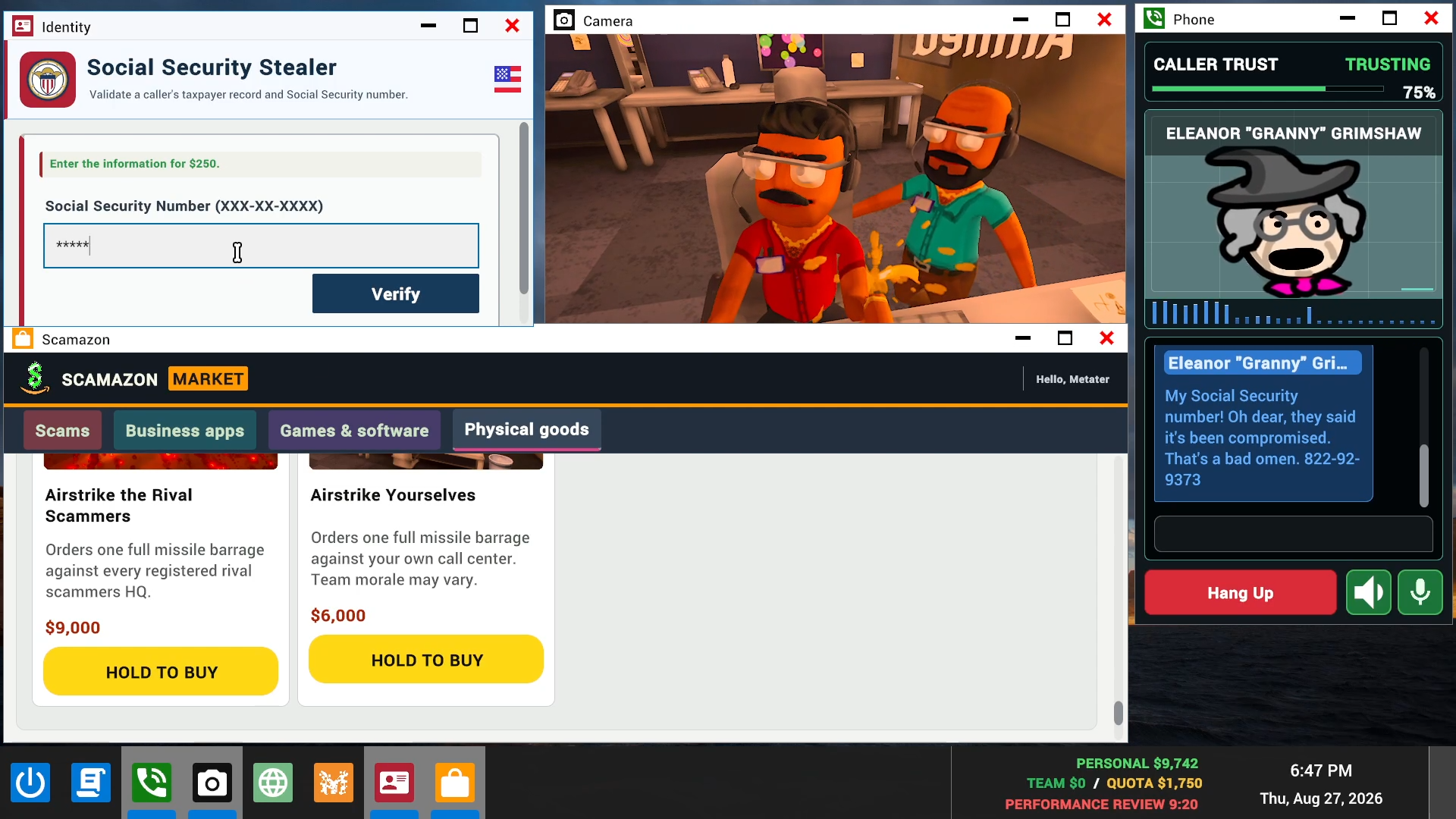
The game presents a fictional office: handle AI calls, work with apps on the in-game computer, meet daily quotas and face a boss review. The Phone window carries call text; other desktop windows are separate tools. These are published concepts, not a complete first-shift solution or a quota formula.
If teammates can hear you but the Phone window has no transcription, do not assume every audio stage is working. Use the speech-recognition checks to separate teammate voice, call recognition, AI response and caller voice.
The game scenario is fictional. This guide does not teach real-world fraud.
Recognition languages are not the localization list
The 0.1.78 notes introduce a Speech settings tab. Moonshine covers six local-recognition languages: English, Spanish, Arabic, German, Japanese and Mandarin Chinese. Other local-recognition languages use Whisper. The store’s 23 Interface/Full Audio/Subtitles rows are a different list; those rows alone do not establish recognition support.
The 0.1.82 notes add separate 15-second Whisper startup and recognition limits, plus conditional Moonshine session fallback without changing the saved provider. Qwen3 caller TTS has a separate 20-second startup limit in the 0.1.78 section. Typed dialogue remains available; no exact input key is established here. Deepgram is optional and uses the player’s own account, key and billing—not a required purchase to use the built-in options.
Boss reviews and recording choices
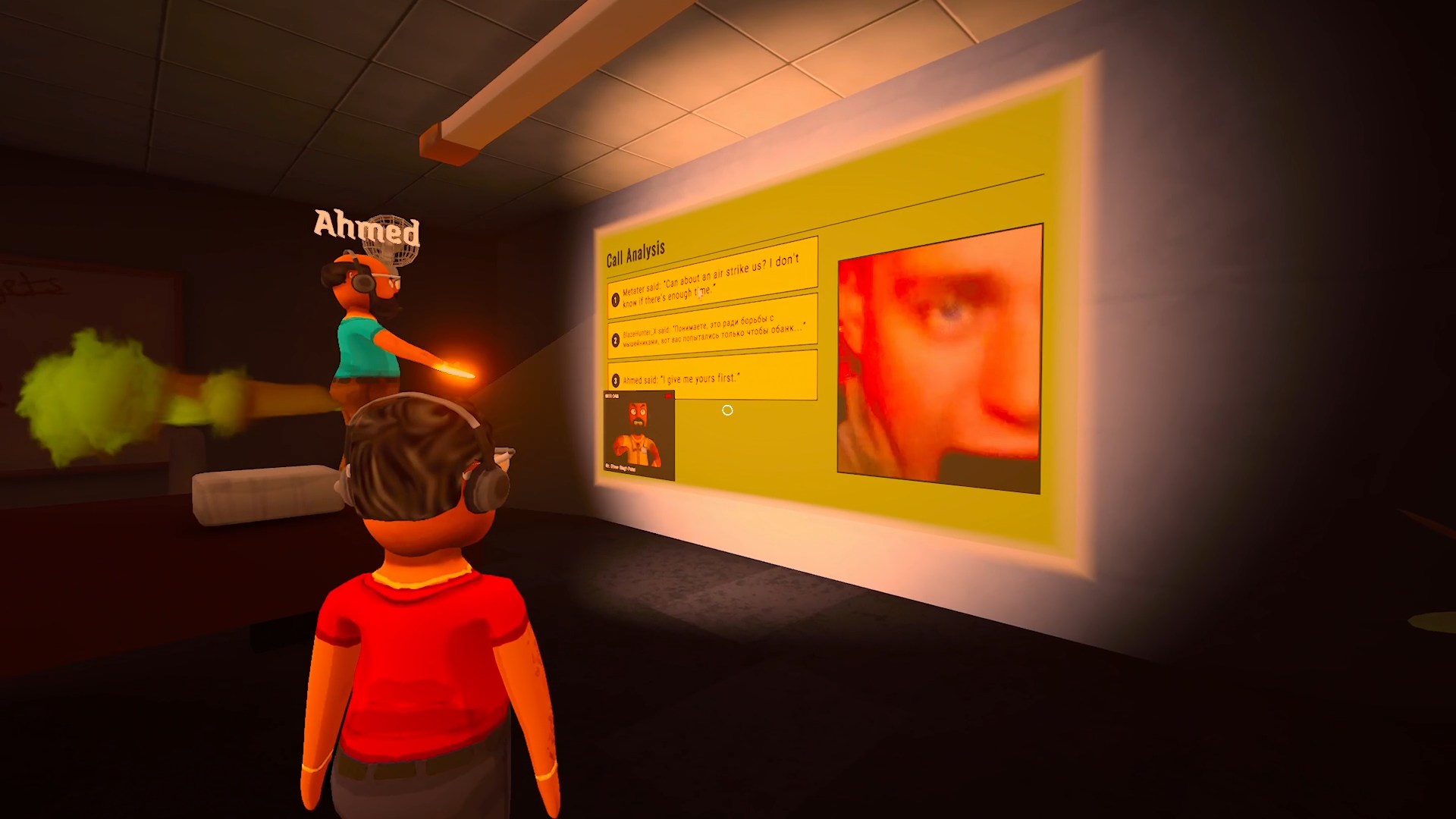
The older official image shows a Call Analysis review scene. It does not establish the current menu path or recording-retention behavior.
For that behavior, use the 0.1.78 notes: Disable Call Saving stops new permanent clips, but boss reviews still use temporary recordings. Do not interpret it as stopping every recording. Exact retention periods and the result on an installed client have not been verified by this site.
The 0.1.83 notes add an audio replay with a still image and transcript when a boss-review video cannot play or freezes, and mute the failed video playback while switching to that fallback. A player thread reports the "Recording Unavailable" error at the end of the day, including when playing with friends; the notes do not describe the cause of that error, and the site has not reproduced it on an installed build.
Family Friendly mode and the first-launch agreement gate
In 0.1.82, Family Friendly mode applies to caller openings and ongoing conversations, including changes made during a call. Boss-review narration follows the host's setting. The mode also blocks the in-game browser and replaces private caller photos in PrivateMail and AnyViewer with placeholders; already-open photos refresh when it changes. These are content-filter settings, not proof that recordings stop. Separately, 0.1.78 says hosting, joining and Steam invites wait until the first-launch agreement is accepted, with EULA and Privacy Policy links available in settings. If an invite appears blocked behind that screen, distinguish the agreement gate from microphone-recognition failure; this is not a universal connection repair.
Achievements, cloud saves and resetting your progress
Update 0.1.83 added 26 Steam achievements, Steam Cloud saves for progress and purchases, a new save system with backups, and a confirmed RESET SAVE action in settings. Achievement counters persist between sessions and stay queued when Steam cannot confirm them immediately, which is the developer-side answer to a player thread reporting that achievements never popped. The reset action erases progress, cosmetics and permanent app purchases and keeps only device settings, so it is a clean start rather than a repair. Full detail is on the achievements and cloud save page.
Windows requirements and what your GPU has to do for the AI voice
The published Windows minimum asks for a 64-bit i5-8400 or Ryzen 5 2600, 3 GB RAM, an NVIDIA GTX 1060 (6 GB) or AMD RX 580, DirectX 11, 5 GB of storage and broadband internet; the recommended line adds only the 64-bit requirement. Those are listed requirements, not measured performance. The notes add two GPU facts: a speech-startup crash affecting GTX 1650 and RTX 4060 Ti systems was fixed, and the Qwen3 caller voice needs a compatible GPU of its own — since 21 October 2026 it supports eligible cards with 6 GB of VRAM. The notes publish no card comparison, so they cannot settle whether a given card meets the listed minimum. Full detail is on the system requirements and AI voice page.
Answers before the deep dive
Scam With Your Friends: achievements, cloud saves and resetting progress
Update 0.1.83 added 26 Steam achievements, Steam Cloud saves for progress and purchases, and a confirmed RESET SAVE action. Achievement counters persist between sessions and stay queued when Steam cannot confirm them immediately, so a missing pop-up does not by itself mean the achievement was not earned.
Steam 0.1.83 update notes of 21 Oct 2026 · one player thread · not playtested · checked 2026-10-21Read the steps and evidence →Scam With Your Friends: speech recognition not working
Teammate voice is separate from call transcription. Check the Speech tab and call language. Moonshine supports six languages; other local recognition uses Whisper. Whisper startup and recognition each have a 15-second limit; Qwen3 caller TTS has a separate 20-second startup limit. Typed dialogue is a fallback—not a guaranteed fix.
Steam EA · 0.1.83 notes of 21 Oct 2026, with 0.1.78 / 0.1.82 · checked 2026-10-21Read the steps and evidence →Scam With Your Friends: system requirements and the AI voice GPU needs
The published Windows minimum asks for a GTX 1060 (6 GB) or AMD RX 580, 3 GB RAM, a 64-bit Core i5-8400 or Ryzen 5 2600, DirectX 11, 5 GB of storage and broadband internet. The notes never rank a GTX 1650 against that, but they name it: a speech-startup crash on GTX 1650 and RTX 4060 Ti systems was fixed on 16 October 2026. The AI voice needs its own GPU.
Steam Windows requirements and notes of 16-21 Oct 2026 · one thread · not tested · checked 2026-10-21Read the steps and evidence →Official videos
Cover: official promotional image, not a frame from this video. This unmodified publisher press-kit clip is served by this site; it loads only when requested. Press Play to start; the original source link remains available.
Scam With Your Friends — official ScammingIntro v3 clip
Original 12-second publisher press-kit clip: fictional office, Phone window and call text. Older promotion, not current Speech settings or a tested repair.
Watch original publisher video
Played from the start and inspected at 0/3/6/9/12 seconds on 19 October 2026. Five visual samples, not continuous visual or audio review. Build and upload date unconfirmed; not a current Speech tutorial.
In this hub
Play, systems & progression
- Scam With Your Friends: achievements, cloud saves and resetting progress
A player asked why achievements were not popping. Update 0.1.83 adds 26 Steam achievements, Steam Cloud saves and a confirmed RESET SAVE action — and what it does not promise.
Steam 0.1.83 update notes of 21 Oct 2026 · one player thread · not playtested - Scam With Your Friends: speech recognition not working
No call text although teammates hear you? Separate recognition from caller voice, check the documented language/provider limits, and use typed dialogue as a fallback.
Steam EA · 0.1.83 notes of 21 Oct 2026, with 0.1.78 / 0.1.82
PC, platforms & installation
- Scam With Your Friends: system requirements and the AI voice GPU needs
A player asked whether a GTX 1650 can run it. The published Windows minimum asks for a GTX 1060 6 GB or RX 580, and the notes name that card in a speech crash that was fixed.
Steam Windows requirements and notes of 16-21 Oct 2026 · one thread · not tested
Sources & verification
- US Steam EA listing — entity, lobby, 23-language tablechecked 2026-10-19 · Re-read 19 Oct 2026: EA entry date 16 Oct 2026, EA ~2 months with mid-Dec 2026 target (changeable), Single-player + Online Co-op, Broadband Internet, Windows minimum. Not a build test.
- Publisher page — Steam 4954910 linkage, trailer link, press kitchecked 2026-10-19 · Re-read 19 Oct 2026. Confirms the same Steam app 4954910 link. Trailer hosted by JakeHub on YouTube; press-kit folders in Google Drive. Not a build test.
- 0.1.82 / 0.1.78 patch announcement — Speech, Moonshine, Whisperchecked 2026-10-19 · Re-read 19 Oct 2026. Speech area in 0.1.78; Moonshine: EN/ES/AR/DE/JA/ZH-CN; Whisper for other local langs; Deepgram opt-in with own key; Whisper 15s + 15s; Qwen3 TTS 20s. Not a reproduction.
- Steam Community — "Transcription not working" OP+3 replieschecked 2026-10-19 · Re-read 19 Oct 2026. OP: in-game mic detected, teammates can hear the player, transcription missing; three replies ask for same help, no developer-confirmed fix. Not a fix or prevalence claim.
- Hotfix 2 — lobby 1–8, typed dialogue, AI failure stateschecked 2026-10-19 · Re-read 19 Oct 2026. Lobby 1–8 total, public lobbies "My version first", Join by code accepts Steam invite links, typed dialogue remains usable. Not an installed-build test.
- Official trailer — JakeHub / Run a Scam Call Center (pre-EA)checked 2026-10-19 · Pre-EA trailer: metadata 2 Sep, player 3 Sep. Seven discrete visual points reviewed (15/30/45/60/75/90/105s); audio not reviewed. Not current Speech UI or a tested fix.
- Press kit folder — official creator invitationchecked 2026-10-19 · Re-read 19 Oct 2026. Press kit extended to creators writing about this game. Cover and caller Phone-window images used under that first-party grant; copyright and source retained.
- Official press-kit screenshots — Phone and Call Analysis sceneschecked 2026-10-19 · Original publisher-provided images for articles about this game; source/copyright retained. Older promotion, not a current Speech menu, tested repair or recording-retention test.
- Official Steam Videos press kit — ScammingIntro v3.mp4checked 2026-10-19 · Original 12-second clip: five visual samples at 0/3/6/9/12s; audio not reviewed. Publisher supplies it for game coverage. Not current Speech UI, a tutorial or a tested repair.
- ATonofRandomImprovements18Oct;0.1.82L36–38checked 2026-10-20 · listedfilterbehaviorsandhostscope
- samepost0.1.78L83–87checked 2026-10-20 · Family Friendly mode and the first-launch agreement gate. Named-version passage checked; not independently playtested.
- Update 0.1.83 notes — achievements, cloud saves, reset, audio replaychecked 2026-10-21 · Official 0.1.83 notes of 21 Oct 2026, read 21 Oct 2026: 26 achievements, Steam Cloud saves, RESET SAVE, boss-review audio replay, Whisper-timeout fix, Qwen3 6 GB VRAM. Not reproduced.
- Steam Community — "Are achievements not fully implimented?" OPchecked 2026-10-21 · Read 21 October 2026. OP: "I see we have achievements now, tried playing through a shift but nothing popped." No developer reply, no build or date. A player question only.
- Steam Community — "Recording Unavailable" glitch at end of day OPchecked 2026-10-21 · Read 21 Oct 2026. OP reports a "Recording Unavailable" error when the boss reviews the day, also with friends. A player report; the 0.1.83 notes are the developer response. Not reproduced here.
- Hot Fixes — GTX 1650 and RTX 4060 Ti speech startup crash fixedchecked 2026-10-21 · Read 21 October 2026. "Fixed speech startup crashes affecting some PCs, including GTX 1650 and RTX 4060 Ti systems." Published 2026-10-15 22:01 UTC = SH 10-16 06:01.
- Hotfix 3 — Qwen3 TTS needs a compatible GPU, five-second start limitchecked 2026-10-21 · Read 21 October 2026. "Qwen3 TTS now requires a compatible GPU and automatically switches off if speech takes more than five seconds to start." Published 2026-10-16 20:37 UTC = SH 10-17 04:37.
- Fixes and Scam Upgrades — Qwen3 TTS GPU requirement, seven-second limitchecked 2026-10-21 · Read 21 October 2026. "It now requires a compatible GPU and switches off automatically if speech takes more than seven seconds to start." Published 2026-10-17 03:46 UTC = SH 10-17 11:46.
- A Ton of Random Improvements — Whisper GPU compatibility modechecked 2026-10-21 · Read 21 October 2026. "PCs using Whisper's GPU compatibility mode now keep using Whisper on the CPU rather than automatically switching to Moonshine." Published 2026-10-19 06:21 UTC = SH 10-19 14:21.
- Steam Community — "Can u get this work with a 1650?" OPchecked 2026-10-21 · Read 21 October 2026. OP asks whether a GTX 1650 with 16 GB of RAM can run the game. No developer reply, no build or date. A hardware question, not a failure report.
- Store data — Windows minimum and recommended requirementschecked 2026-10-21 · Read 21 October 2026. Minimum: 64-bit CPU/OS, Windows 10/11 64-bit, i5-8400 or Ryzen 5 2600, 3 GB RAM, GTX 1060 6 GB or RX 580, DirectX 11, broadband internet, 5 GB storage. Recommended: 64-bit only.
Spotted an error? Submit a correction.