Sovereign Tower
Manage a magical court, match eccentric knights to quests, balance factions and revisit decisions by turning back time.
1.2.0 Round Table inventory: unequip scopes and filters
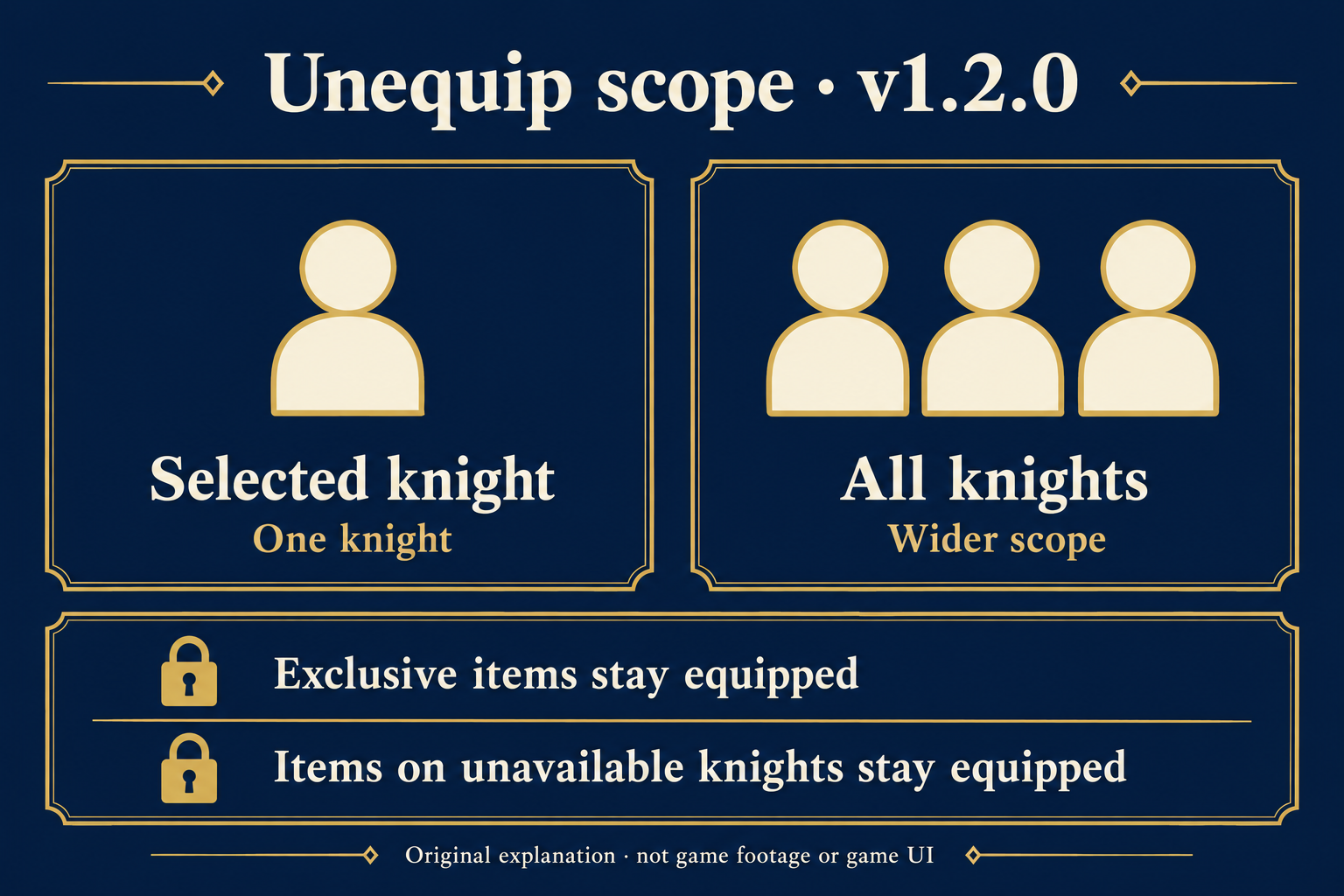
Patch 1.2.0 adds two equipment-removal options within the Round Table inventory: one for the selected knight and one for all knights. Exclusive items and items on unavailable knights are not removed by these operations. The announcement does not define which knight states count as unavailable.
The same update adds stat filters. When several are selected, an item must have every selected stat: Strength AND Magic is an intersection, not a request for either stat. Inventory pawns also indicate whether a knight is assigned to a quest, away or training; these indicators do not establish additional gear-removal rules.
Use the knights and inventory guide for the two scopes, exceptions and filter example.
Petitions, knights and time reversal
Subjects bring petitions to the ruler; accepted quests are assigned at the Round Table. The store names Strength, Agility, Charisma, Magic and Wit when describing knight skills. That list is not presented here as an exhaustive character-sheet or filter-option list.
Consider the treasury and relationships with Merchants, Mystics, Scholars, Nobles and People as well as quest requirements. The official description warns that dissatisfied knights may leave and describes annexes for court roles and crafting. It also introduces a demon in the crypts who can reverse time so the ruler can revisit decisions. Specific recruitment conditions, success formulas and rewind carry-over rules need more detailed evidence.
The inventory guide covers the new 1.2.0 options without claiming they solve a particular quest outcome. The publisher's launch trailer shows the court loop and the choice system on screen: named knights with their own dialogue boxes - Ardin, Saoirse, Medina, Chester, Arnold, Damian, Gwendian, Brunhilda and Rowan - a panel that offers two replies ("I'm a country bumpkin. Go on, Damian." and "I'm a snob. I'm listening to you, Arnold."), chapter cards that read Recruit Legendary Knights and then Romance Legendary Knights with the first word struck through, and a final card reading Manage Your Round Table. Those cards are the publisher's own statement of the progression this zone describes.
Platforms, play modes and input
The current Steam record advertises Windows, SteamOS / Linux. This describes the Steam edition, not every storefront or console release.
Listed play and input features
- Single-player
- Full controller support
- DualShock Controller Support
- DualSense Controller Support
- Save Anytime
The badges above describe publisher-listed features. They do not establish every crossplay pairing, controller binding or matchmaking rule. See the platforms and requirements answer for the full Windows minimum/recommended tiers, the separate SteamOS + Linux tab and the current scope of the controller listing.
Windows minimum and recommended configurations
Publisher-listed Windows requirements, read on 18 October 2026. These are specifications, not performance measurements by this site.
Minimum Windows configuration
| Item | Published requirement |
|---|---|
| OS | Windows 10 |
| Processor | Intel Core i5-4670K |
| Memory | 4 GB RAM |
| Graphics | GeForce GT 1030 (2048 MB) |
| DirectX | Version 12 |
| Storage | 3 GB available space |
Recommended Windows configuration
| Item | Published requirement |
|---|---|
| OS | 11 (as listed) |
| Processor | Intel Core i5-9600K |
| Memory | 8 GB RAM |
| Graphics | GTX 1060, 6GB VRAM |
| DirectX | Version 12 |
| Storage | 3 GB available space |
The recommended tier's OS field is published as the literal 11; this page preserves the listing rather than rewriting it as Windows 11. See the platforms and requirements answer for the separate SteamOS / Linux tab and the controller boundary.
Demo entry and six-language matrix
The full-game store page links a separate demo app, 4422320. A download entry does not establish save compatibility with the full game; a transfer procedure was not verified in this review.
The expanded language table lists English, French, German, Japanese, Korean and Simplified Chinese. All six rows mark interface and subtitles. Full audio is blank in each row; blank does not establish the absence of audio. The platform guide shows each row and both operating-system panels.
Use the current official store for the price and offers in your region. Historical price snapshots are not treated as a newly checked promotion.
Kitchen meal feedback: blank dislike history is not approval
Patch 1.0.11 adds kitchen feedback for meals already given to knights: a thumbs-up indicates a liked meal and a thumbs-down a disliked one. The developer explicitly says the disliked-meal history is not retroactive. If an older meal has no dislike marker, do not treat that blank as proof the knight likes it; the patch may not have filled in that earlier dislike. Use newly displayed feedback as a record of that knight's reaction, not as a universal food table or a romance guarantee. This is a published UI checkpoint, not a complete recipe, ingredient or affinity guide.
What the store lists today for Sovereign Tower
Re-read 21 October 2026: the listed US price is $19.99 with no active discount, and Steam marks the game for Windows and Linux (SteamOS 3.8.10, Zen 2 4c/8t, 4 GB RAM minimum, 8 GB recommended) but not macOS. The listing names six interface languages — English, French, German, Japanese, Korean and Simplified Chinese — and carries a separate demo product. The store's own feature list has eleven entries: Single-player, Steam Achievements, Full controller support, Custom Volume Controls, Playable at Your Own Pace, Playable without Timed Input, DualShock and DualSense controller support, Save Anytime, Steam Cloud and Family Sharing. The newest official post is Patch 1.2.0, the major narrative update published 15 October 2026 and free to owners, which brings new conversations, expanded storylines and quality-of-life improvements.
What Sovereign Tower players are asking
These are real questions players asked in the game's own Steam discussions, re-checked against the thread on 21 October 2026. The thread link for each one is in this section's sources. Where the developer has published an answer it is linked; where they have not, the question is left open rather than guessed at.
- "Are these towns suppose to stay damaged?" — asked in the Steam thread Unable to repair towns in Southbay?*; intent: Whether damaged towns can be repaired at all.
- "am i just completely locked out of accessing the art book at all?" — asked in the Steam thread Unable to access artbook if I only have a steam deck?*; intent: Accessing the bundled artbook on a non-Windows machine.
- "Have you considered adding a high contrast mode for accessibility so the text is white on black or black on white?" — asked in the Steam thread High Contrast Mode?*; intent: Accessibility: low text contrast and readability.
- "the game ignores the windows SDR brightness slider" — asked in the Steam thread I need a brightness slider*; intent: Accessibility and comfort: display brightness and HDR behaviour.
- "Am i the only one having this issue since the game launched and did anyone succed in fixing it" — asked in the Steam thread Dark Castle*; intent: Rendering: near-black screen in the knight-selection room.
- "All my slot are used. how can I supress a save ?" — asked in the Steam thread How to supress a save ?*; intent: Save-slot management and starting a fresh playthrough.
- "I wanted to backup my current saves, but I can't find where they are." — asked in the Steam thread Save File Location?*; intent: Locating save files to back up a playthrough.
- "it would be nice if there was a button to unequip everything everyone has equipped" — asked in the Steam thread [Feature Request - Added!] Unequip All Button at Round Table*; intent: Round Table inventory QoL (bulk unequip).
- "if I open up the map from either the wheel selection or from the map room I'm not able to interact with anything" — asked in the Steam thread Cannot interact with map on steamdeck*; intent: Map interaction on Steam Deck and controller.
We could not read a search-volume source for any of these, so this list shows that the questions were really asked, not how many people search them.
Answers before the deep dive
Sovereign Tower demo, Windows and SteamOS requirements
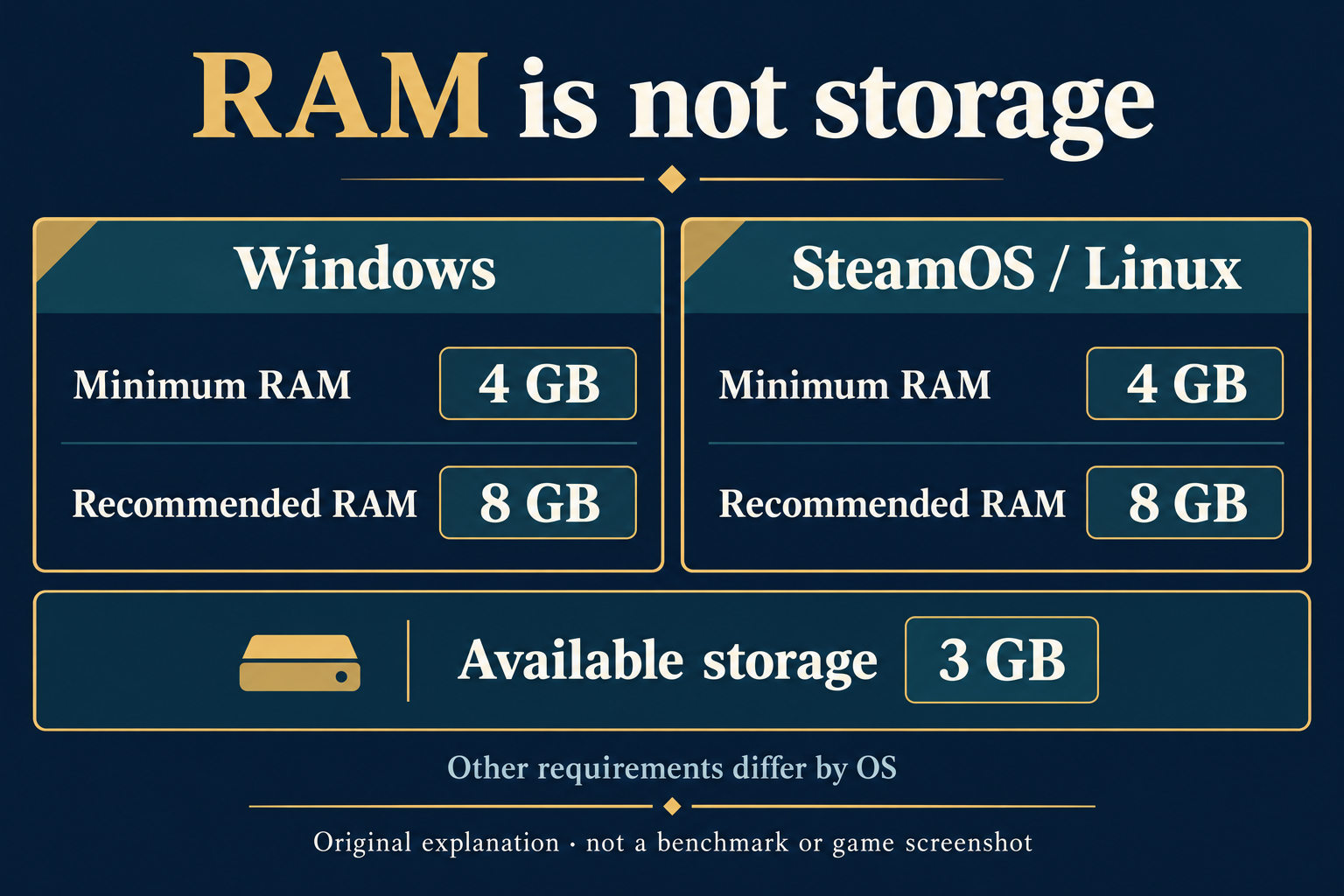
The full-game page links demo app 4422320; save compatibility was not verified. Both Windows and SteamOS/Linux list 4 GB minimum RAM, 8 GB recommended RAM and 3 GB available storage. Their CPU, GPU and OS requirements differ; Windows recommended OS is listed literally as 11.
Steam US-English store; Windows/Linux and demo entry checked 18 October 2026 · checked 2026-10-18Read the steps and evidence →Sovereign Tower: unequip gear, filter inventory and assign knights
In version 1.2.0, the Round Table inventory offers unequip options for the selected knight or all knights. Exclusive items and items on unavailable knights are not removed. Select several stat filters to show only items that match every selected stat.
Steam 1.2.0 patch notes 2026-10-15 · checked 2026-10-18 · checked 2026-10-18Read the steps and evidence →In this hub
Play, systems & progression
- Sovereign Tower: unequip gear, filter inventory and assign knights
The 1.2.0 Round Table inventory supports selected/all unequip scopes, with documented exceptions, and AND-style multi-attribute filters. Status badges only describe the shown knight.
Steam 1.2.0 patch notes 2026-10-15 · checked 2026-10-18
PC, platforms & installation
- Sovereign Tower demo, Windows and SteamOS requirements
The full game uses appid 4113940; its published demo link points at appid 4422320. Windows and SteamOS/Linux are listed as separate tiers with their own RAM and storage entries.
Steam US-English store; Windows/Linux and demo entry checked 18 October 2026
Sources & verification
- Official Steam store — features and system requirementschecked 2026-10-08 · US-English listing read directly; no independent playtest.
- Steam game page and promotional gallerychecked 2026-10-11 · Official US-English listing and promotional media; not independent gameplay testing.
- Steam official game detailschecked 2026-10-11 · Public API read on this date; published features and Windows requirements.
- Steam — demo link, $15.99 discount window, language tablechecked 2026-10-11 · Official source checked 11 October 2026. Details appear in the cited section. Published hardware targets are not independent benchmarks.
- US-English store: six languages, Windows and SteamOS/Linux tierschecked 2026-10-18 · Direct parent browser read: Windows/identity 11:41 UTC; expanded language table 11:41 UTC; Linux tab 11:45 UTC. Promotional asset capture dates remain 11 October. No installed-build or benchmark test.
- Patch 1.2.0 (15 October): visible QoL and relevant bug fixeschecked 2026-10-18 · Parent read visible QoL and relevant fixes; hidden story spoilers were not expanded. Confirms options inside the inventory, not a new inventory. No installed-build or unavailable-state definition.
- PatchNotes1.0.11,27Aug;NewFeaturesL461–464checked 2026-10-20 · feedbackmeaningandoldhistorylimitation
- Store data — release field, price, platforms, languages and demochecked 2026-10-21 · Read 21 October 2026. Release field Aug 6 2026; $19.99 with no discount; Windows and Linux true, macOS false; six interface languages; separate demo appid 4422320. Read once, not a build test.
- Official feed — the 6 August launch post and Patch 1.2.0checked 2026-10-21 · Read 21 October 2026. The launch post is dated 6 August 2026; Patch 1.2.0 (15 October 2026) is the major narrative update and is free. Not reproduced in full.
- Steam thread: Unable to repair towns in Southbay?checked 2026-10-21 · Re-read 21 Oct 2026. Original post asks: "Are these towns suppose to stay damaged?".
- Steam thread: Unable to access artbook if I only have a steam deck?checked 2026-10-21 · Re-read 21 Oct 2026. Original post asks: "am i just completely locked out of accessing the art book at all?".
- Steam thread: High Contrast Mode?checked 2026-10-21 · Re-read 21 Oct 2026. Original post asks: "Have you considered adding a high contrast mode for accessibility so the text is white on black or black on wh".
- Steam thread: I need a brightness sliderchecked 2026-10-21 · Re-read 21 Oct 2026. Original post asks: "the game ignores the windows SDR brightness slider".
- Steam thread: Dark Castlechecked 2026-10-21 · Re-read 21 Oct 2026. Original post asks: "Am i the only one having this issue since the game launched and did anyone succed in fixing it".
- Steam thread: How to supress a save ?checked 2026-10-21 · Re-read 21 Oct 2026. Original post asks: "All my slot are used. how can I supress a save ?".
- Steam thread: Save File Location?checked 2026-10-21 · Re-read 21 Oct 2026. Original post asks: "I wanted to backup my current saves, but I can't find where they are.".
- Steam thread: [Feature Request - Added!] Unequip All Button at Round Tablechecked 2026-10-21 · Re-read 21 Oct 2026. Original post asks: "it would be nice if there was a button to unequip everything everyone has equipped".
- Official store trailer: Sovereign Tower - Launch Trailer (EN) (movie id 25739294checked 2026-10-22 · Official store trailer, movie id 257392947, published 2026-08-06; the published excerpt was read frame by frame on 2026-10-22 (audio not reviewed). Promo footage, no build stamp.
Spotted an error? Submit a correction.